

Many digital audio workstations are designed especially for musicians. FL Studio and Apple Garageband are some great examples. Yet, other software is much more diverse.
In fact, some software is better suited to mixing and editing audio for film and videos, recording and editing ADR and/or inserting sound effects and Foley in addition to working well for music composition and looping sounds. In this article, we’ll look at the best audio editing software for video editors. Then, at the end of the list, we’ll go over some key features to consider as you shop.

The Editors’ Choice award recognizes exceptional video production equipment, software and services. These products must help videographers be more effective storytellers while being affordable, easy to use and dependable. The products must also deliver a superior user experience.
Best enthusiast audio editing software
Magix SOUND FORGE Pro 18

Strengths:
- Inexpensive
- 5.1 surround sound
Weaknesses:
- Primarily focused on music production
While the name may not be as familiar to editors using Adobe, AVID or Apple Products, Sound Forge has been around for over 25 years. Magix SOUND FORGE Pro 18 is designed for professionals and serious audio enthusiasts. It boasts advanced recording capabilities with high-resolution audio, powerful editing tools like spectral editing and pitch shifting, and a handy set of mastering tools, including iZotope Ozone 9 Elements, which is a nice plus.
The software also features over 20 professional effects and supports VST3 plugins, offering extensive customization options. Its user-friendly, customizable interface and enhanced restoration tools make it ideal for music production, podcasts, and audio for video. Compatible with Windows 10 and 11, SOUND FORGE Pro 18 is a valuable investment for high-end audio production.
Perpetual license — new purchase: $399
Perpetual license — upgrade: $399
Best professional audio editing software
Adobe Audition CC

Strengths:
- Audio restoration tools
- Multitrack capabilities
- Creative Cloud integration
Weaknesses:
- Monthly subscription required
One of Audition’s greatest strengths is its audio restoration abilities. However, it can also be used to record and edit music clips. The latest version adds new DeNoise and DeReverb tools as well as general improvements to the interface and multitrack management.
Audition also has the advantage of being bundled with Adobe Creative Cloud. If you already have a subscription to Adobe CC for its powerful software suite, then Audition is a great bonus that you should consider trying. Adobe CC lets you easily move projects from Audition to Premiere and vice versa, which can make your overall post work a much quicker process. It’s also important to note that Audition has a stand-alone monthly subscription if you don’t plan to use Adobe’s other offerings.
Currently, you can get the complete Adobe CC for $60 a month or pay $23 for just Audition. Adobe also offers a complete seven-day free trial with no credit card required. Adobe Audition is compatible with both Mac and PC.
$60 per month for complete Adobe CC
$23 for just Audition
Best plug-in
iZotope RX 12 Standard/Advanced
Strengths:
- Scene Rebalance
- Dialogue Isolate
- Voice De-noise
- Real-time processing
Weaknesses:
- Advanced option is expensive for a repair tool
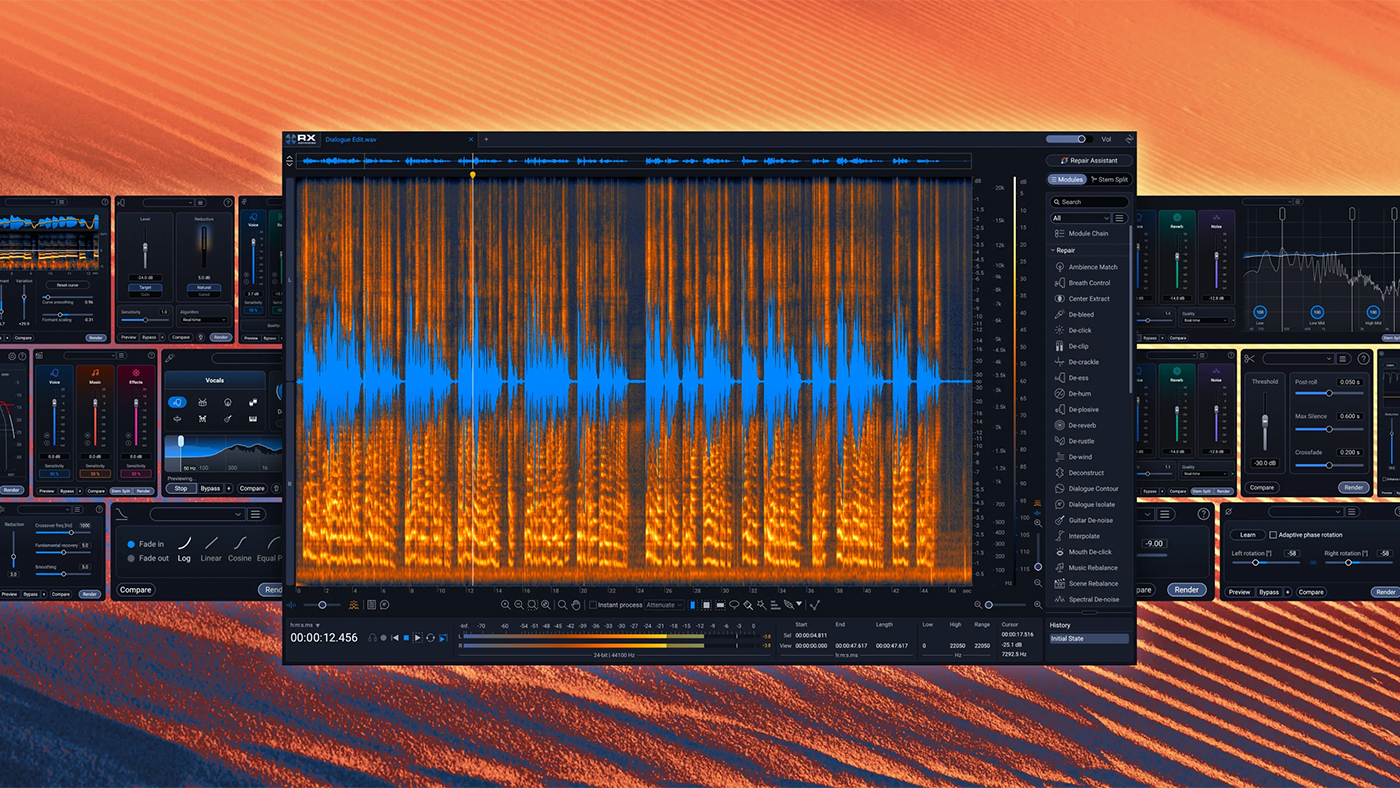
iZotope RX 12 is a powerful audio repair plug-in with a toolset designed to clean up problem recordings. It carries forward the staples editors rely on, like De-ess, De-plosive, De-reverb and Voice De-noise, then sharpens them with new machine learning. The RX line has long been the industry standard for restoration, and version 12 pushes it further still.
The standout addition for video work is Scene Rebalance. It takes a finished stereo mix and separates it into distinct dialogue, music and effects tracks, so you can re-level a scene without ever touching the original stems. A new Stems View lays those elements out side by side for faster editing. The upgraded Dialogue Isolate tool now runs a new neural net and works in real time, which means you can clean up noisy dialogue and tame reverb in a single pass right inside your timeline.
Like earlier versions, RX 12 comes in tiers, and the price climbs as you add tools. Most video editors will find what they need in Standard, while heavy post-production users get Scene Rebalance and multiband processing in Advanced. There’s also an Elements tier aimed squarely at content creators on a budget. It’s worth comparing the three before you buy so you land on the right set of tools at the right price.
RX 12 is compatible with host programs like Adobe Audition, Adobe Premiere Pro and Apple Final Cut Pro. It runs on macOS and Windows.
iZotope RX 12 Elements: $99
iZotope RX 12 Standard: $399
iZotope RX 12 Advanced: $1,399
Best free audio editing software
Audacity

Strengths:
- Free
- Expand features with plug-ins
- Open-source community support
Weaknesses:
- Destructive editing only
Audacity is a fast, free open-source audio editing software that’s also really easy to use. Some people don’t like it and don’t consider it a true DAW because it’s a destructive file editor; however, with the right file management, this really isn’t an issue.
Audacity can record and edit 16-bit, 24-bit, and 32-bit samples at up to 96 KHz sample rate and can import a wide range of file formats. The software has a wide range of tools included but can be further expanded with plug-ins for increased integration with other programs or to add new effects.
There are unlimited Undo (and Redo), and the only limit to the number of tracks you can edit and mix are the limits of your computer’s processor and RAM. This free software also has some good plug-ins. FFmpeg, for instance, allows you to edit your audio in sync with your video file. If you’re looking for free software that can work with an older system, this is a good option. Audacity is compatible with Windows, Mac OS or Linux.
Free
Features we considered
You can do a lot of audio work directly in your video editing software, but when you need more specialized tools, a separate audio editing program can really come in handy. Moreover, if you’ve hit the limits of your built-in audio tools, it might be time to look for a more robust solution.
What can your editing system support?
Before we get into features and capabilities, the first step to finding the right audio editing software for you should be to consider your computer hardware. That said, some audio software requires more processor power than many video editing packages. Plus, there’s a chance your audio card may also need to be upgraded. With that said, an external audio device might be an easy solution for this. Other factors such as your computer’s operating system can also be a factor since some DAWs are OS specific. In fact, some of these audio editing programs are even specific about the version of that OS. For example, the program might work on Windows 7 but not on Windows 10. Likewise, if you’re considering an audio editing plugin, make sure it’s compatible with your preferred host software.
Some audio editing software is more specialized than others, so carefully consider how your needs match up with the software’s capabilities before you buy. Here are some of the features that might compel you to invest in a dedicated digital audio workstation.
Equalizers and spectrum analyzers
One of the biggest benefits of many DAWs is their equalizers and spectrum analyzers. Most video editing software offers high pass and low pass equalizer (EQ) filters but don’t have 32 band EQ or parametric EQs which are almost standard for DAWs. These more sophisticated EQs allow you to isolate and remove specific sounds from a clip like the chirping of a cricket.
Additionally, if you are needing to enhance or eliminate a particular sound in a mix, this can be tricky to do with video editing software because the only graphical view you can often get is an audio waveform showing the gain, or volume. A spectrum analyzer shows you a graph of the gain of different frequencies. Using this can save a lot of time lost to guesswork. For example, if you’re trying to augment a person’s voice, you can look at the spectrum analyzer for the right range of frequencies — around 500 Hz to 2 kHz for most people — and find the peaks to show you how you’ll want to adjust your equalizer to enhance their voice.
Noise reduction and clip restoration
Video editing software rarely had much in the way of tools for cleaning up audio clips. Audio editing and repair used to be a painstaking process that typically left you with subpar results. Now many issues can be fixed with a simple click of a button — if you have the right toolset.
If you have audio that has a lot of noise, distortion or additional common issues, a DAW is often your best hope for fixing those tracks.
If you have audio that has a lot of noise, distortion or additional common issues, a DAW is often your best hope for fixing those tracks. Look for options that come with de-noise and de-reverb capabilities, since these will likely be your most common audio issues. If you know you often encounter the same specific audio issue, put a tool that can help with that at the top of your wishlist.
Plug-ins and file types
Using a DAW is often the only way to get access to some of the powerful audio plugins in formats like VST. Some of these are plugins are even free and can greatly expand your options for repairing your audio and adding stylistic effects.
Additionally, using a DAW will often allow you to work with higher quality file formats like Broadcast WAV (BWF) and AIFF, giving you flexibility and metadata capabilities that aren’t available in containers like WAV and MP3.
DAWs and controllers
The ability to use a control surface is one factor that sets DAWs apart from your editing software’s built-in audio tools. For example, when many think of DAWs, large mixing consoles is what immediately comes to mind. Picture an audio engineer laying down music tracks like Lucious Lyon in “Empire.”
However, mixing consoles can also be used with DAWs to manipulate sound for your video projects. These controllers range in capabilities and price, but they give you an interface that is easier to work with.
That said, the price range for controllers is also similar in pricing to camera support; they start at less than a hundred dollars with prices into the thousands depending upon the features offered. Additionally, most digital mixers can be used as controllers, and many DAWs support live multi-track recording. It’s important to note that many users don’t consider a DAW to truly be a workstation without a hardware controller.
Before you buy
With all of these software options, there are many features that they have in common. However, there are also quite a few unique tools specific to each software. Unfortunately, there were too many features for each program to list in this article.
Most editors consider using a DAW when there’s a particular problem with a project that they need to solve. Therefore, the feature that provides that solution may be what influences your purchase the most. However, video editors usually continue to use their DAW for greater audio control. In the end, there is no single best DAW; the best DAW for you will be the one that fits your needs and your budget.
Contributors to this article include W. H. Bourne and the Videomaker Editorial staff.

